
BLOGDOG
Your personal cyber security and anti-hacking news
What Should I Do If My Youtube Account or Channel Was Hacked

Did you notice a video published on your channel, but you’ve never seen it before and definitely did not upload it? Did Videos that you published suddenly disappeared or information like video titles have been changed? If so, most chances are that your YouTube channel has been hacked. That’s not fun.
It’s important to note that YouTube uses Google’s account, so if your YouTube has been hacked it is most likely that the hacker has access to all of your other Google services, such as Gmail, Google+ and more.
If you suspect your YouTube account has been hacked, but still have access to your account, do the following:
1. Change Your Password
First thing first, go to the following page https://accounts.google.com/b/0/EditPasswd?hl=en&continue=https://myaccount.google.com/ and change your password.

Cahnge your password
Choose a complex password, with lower case letters, upper case letters and digits. If possible, add special characters like hash or exclamation point. Make sure it is at least 8 characters long. It is best not to pick dictionary words.
2. Perform a security checkup
Google allows you to perform a quick security checkup to look if anything has been changed in your account and to take action in case something is indeed found suspicious. Simply go to your account page (https://myaccount.google.com/) and click on “Get Started” under “Security Checkup”.

Click on “Get Started” under “Security Checkup”
.You will be taken to a multi-step process that will allow you to review all the crucial details on your account.
3. Check Last Logins
In case your account has been breached it is important to rule out any possibility that the hacker wasn’t after YouTube, but Gmail. Therefore, if you are a Gmail user, access your account and scroll down to the bottom of the page. Click on “Details” at the bottom right corner.
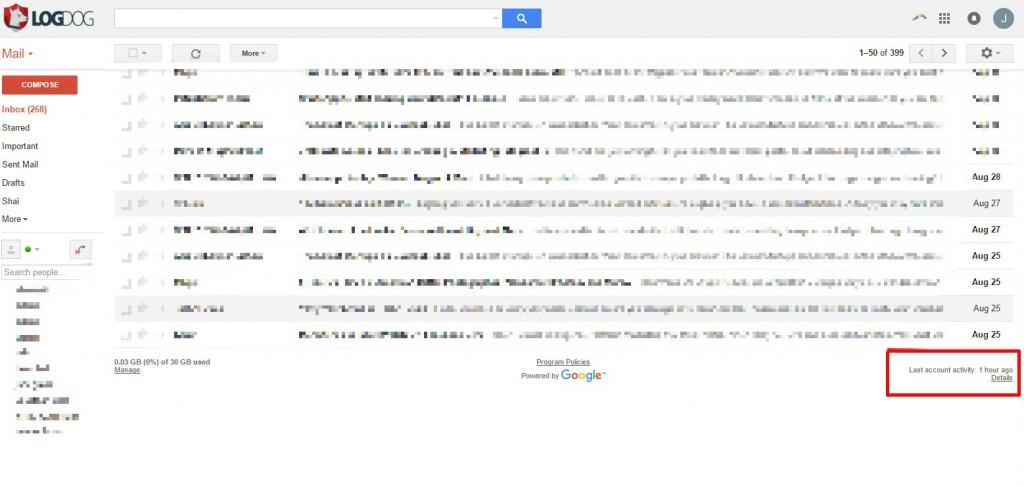
Sign into your Gmail and click on “Details” at the bottom right corner.
A pop-up will appear with a list of last access sessions, which may indicate whether indeed your account has been hacked.

Check the last activity on your mail account and any concurrent activity.
4. Review Your Activity
If you still suspect that a hacker has or had access to your account, it is best to review your account activity. Go over posted videos, likes, etc. to make sure nothing was done under the pretense of your name. If you do find an activity, such as a posted video, attempt to remove it or report it to YouTube if it cannot be undone.
5. Check Your Other Accounts
If you are re-using your password in other websites, such as Facebook or iCloud – change the passwords on these services immediately. Make sure you are still able to log into these services. Attackers often use password re-use (an ill-advised but common practice) to gain access to additional accounts of the victim!
6. Run an Anti-Virus on your Computer
Many times attackers gain their victims’ passwords using Trojan horses that were installed on the victims’ computers. If your machine is infected, changing the password will not help, as the malware will capture the new password and send it to the hacker.
7. Activate Two-Step Verification
To secure your account further and make sure no one is able to access your account, enable the Two-Step Verification on your Google Account here: https://accounts.google.com/b/0/SmsAuthConfig?hl=en.

Go to “Signing in to Google”
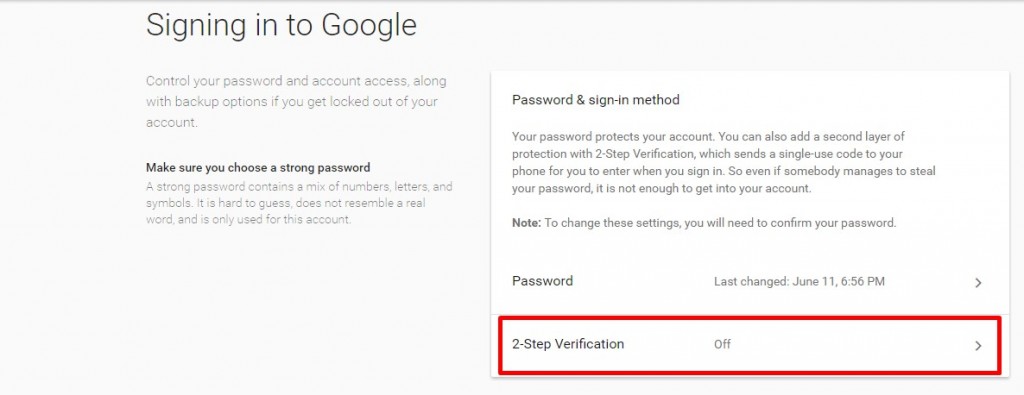
Click to enable 2-Step Verification

Click “Get Started” to set up 2-step verification
Whenever you will sign in, Google will require you to provide a unique code that will appear on the “Google Authenticator” app on your mobile. Thus, providing you with an important and effective extra layer of security.
What happens if my passwords have been changed?
If you are unable to log into your Google account, use the following form https://www.google.com/accounts/recovery/, select “I’m having other problems signing in” and attempt to go through the process of recovering your account.
Final tip - Get Log Dog!
Download and install Log Dog from Google Play or iTunes App store . Log Dog is a mobile Intrusion Detection System which monitors and protects your Google Account as well as your other accounts such as Facebook and Yahoo?
Find out more:
Protect your Twitter account - What Should I Do If My Twitter Account Was Hacked?
Make sure your Instagram account is protected - What Should I Do If My Instagram Account Was Hacked?
Learn how to protect your Steam account - What Should I Do If My Steam Account Was Hacked?
Visit our Blog and use the Search Box to find out more guides for more online accounts.