
BLOGDOG
Your personal cyber security and anti-hacking news
Help! My Pinterest Account may have been hacked!

If you suspect your Pinterest account has been hacked, but still have access to your account, do the following:
-
If your Pinterest account was hacked, there’s a good chance your email was too…
Start by checking if your email account has been hacked - because most hacks start within your email.
Do it using this free tool to find and help you remove exposed passwords, credit cards, bank and social security numbers in your email account, and keeping you safe.
The tool will keep you safe by removing any and all private data putting you at risk for credit card and identity theft. So if hackers hack your inbox, they won’t find what they’re looking for, and you’ll be protected.
You can also notify friends who sent or received the risky email, and ask them to delete the thread. Once you’ve managed your email, you can now deal with your Evernote account.
-
Change Your Password
On https://www.pinterest.com/settings/, click on “Change your password” and provide the current password as well as the new one.
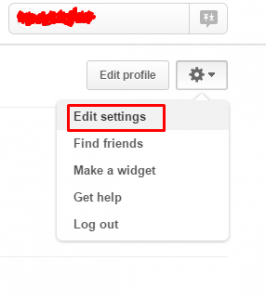
Go to “Edit settings”
Click on “Change your password”
Choose a complex password, with lower case letters, upper case letters and digits. If possible, add special characters like hash or exclamation point. Make sure it is at least 8 characters long. It is best not to pick dictionary words.
Bad password ☹
Good password 😊
-
Verify your E-mail has not been changed
As Pinterest allows its users to change the E-mail associated with their account, make sure that your E-mail address has not been changed.
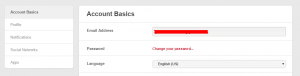
Verify that your email is correct under “Email address”
This can be done on the same page (https://www.pinterest.com/settings/).
Hackers may try and change it to something similar, so pay close attention. If your E-mail account has been changed, simply change it back and click “Save Settings”.
-
Go over Apps permissions
Go over the list of apps that are permitted to access your account via the settings page (https://www.pinterest.com/settings/).
Click “Apps” in “Account settings”
If you see unfamiliar apps that are attached to your account, remove it.
-
Check Your Activity
After you’ve changed your password and verified that the E-mail refers to your account, make sure to go over your recent activities, boards and “pins”.
The reason why criminals would want to hack into your Pinterest is to use it as a platform for spamming.
Using legitimate accounts with existing followers is much more efficient than to start a new account from scratch.
To protect your followers, make sure a hacker did not have the time to post on your behalf. Spammed “pins” can be dangerous and lead users to sites that try to infect them with malware.
-
Check Your Other Accounts
If you are re-using your password in other websites, such as Gmail or iCloud – change the passwords on these services immediately.
Make sure you are still able to log into these services, and use this free tool to check if your password was exposed to hackers.
Attackers often take advantage of users’ tendency to re-use password (an ill-advised but common practice) to gain access to additional accounts of the victim!
-
Run an Anti-Virus on your Computer
Many times attackers gain their victims’ passwords using Trojan horses that were installed on the victims’ computers.
If your machine is infected, changing the password will not help, as the malware will capture the new password and send it to the hacker.
If you are unable to access your account and you believe this is the result of a hacker, do the following:
-
Check Your Other Accounts
Make sure that you still have access to the E-mail account associated with your Pinterest account.
If you are using the same password, change it as soon as possible. Do so to any other online account that shares the same password as your Pinterest account.
If you are unable to access your E-mail address as well you may try to recover it. Check out our guides for Gmail and Yahoo.
-
Reset Password
Reset the password of your account by going to https://www.pinterest.com/password/reset/ providing your E-mail address.
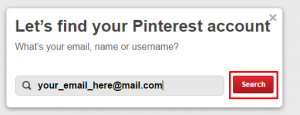
Search your email
Press “Send”
After email has sent - check your Inbox
Once you’ve obtained a new password – go over the top section of this guide.
If you are unable to reset your password for whatever reason, contact Pinterest Support.
Finally, Get Log Dog
Its FREE!
Download and install Log Dog from . Log Dog is a mobile Intrusion Detection System which monitors your online accounts, including Gmail, Yahoo, Evernote, and many others. It alerts you immediately when something is suspicious and allows you to act in order to keep intruders out.
The service can be used across all devices and OS’s, so you’re always being protected. Here’s the Android and iOS links for you to check out!
-
David Kinlay