
BLOGDOG
Your personal cyber security and anti-hacking news
What Should I Do If My Facebook Account Was Hacked?

Do you think your Facebook account was hacked? Perhaps you noticed “likes” you didn’t make, new groups you’re suddenly a member of, or new Facebook apps you didn’t install. Do you still have access to the account? If so, here are some steps you can take to fix your account.
1. If your Facebook was hacked, there’s a good chance your email was too.
Start by checking if your email account has been hacked because most hacks start within your email. Use this free tool to find and help you remove exposed passwords, credit cards, bank and social security numbers in your email account.
This tool will remove any and all private data putting your online accounts at risk.
You can also notify friends who sent or received the risky email, and ask them to delete the thread. Once you’ve managed your email, you can now deal with your Instagram hack.
2. Change your password
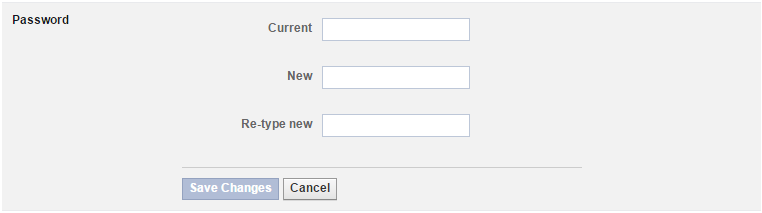
One of the first steps you should take if you suspect your Facebook account was hacked is change your password. You can do so in your General Settings page. This time, make sure you choose a complex password that includes lowercase letters, uppercase letters, and at least one number. You should also add a special character like a question mark or exclamation point. Make sure your new password is at least eight characters long, and avoid dictionary words.
3. Report your compromised account
If your Facebook account has been hacked, but you still have access to your login email, you should let Facebook know about it by reporting a compromised account. When you do so, Facebook will help you regain control over your account. Click here to submit a Compromised Account report.

4. Check active sessions
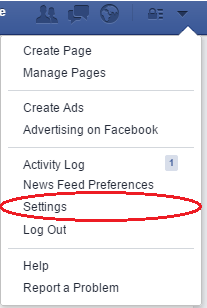
Facebook has a handy tool in the Facebook Security page that allows you to see which devices are logged into your account. To get to this page, click on the arrow at the top right and select “Settings” from the drop-down menu that appears.
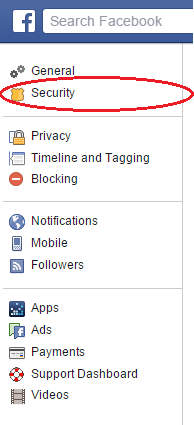
Next, select “Security” from the left-side menu.
Then, click “Where You’re Logged In.”

If you see an unfamiliar device listed there, click “End Activity.”
Keep in mind that this tool, while convenient, doesn’t always provide an accurate depiction of who is currently logged into your account, and clicking “End Activity” alone won’t protect your account.
5. Check your recent activity
If you remember when your latest Facebook activity was, it can be easier to detect whether your Facebook account was hacked. Check your recent activity by clicking on the arrow at the right corner of the top navigation bar in Facebook and choosing “Activity Log.” This page lists all the activity associated with your account.

You should also review your recent Messenger activities and private messages. And, visit the Payments page to make sure your account hasn’t been used to make any payments.
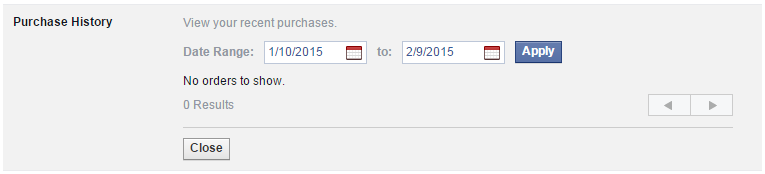
If you notice any abnormal behavior associated with your Facebook account, it’s a good indication your account was indeed hacked.
6. Activate Login Approvals
There is a login approvals tool that can help you protect your Facebook account from hackers. This tool is like Facebook’s version of two-factor authentication. To use this feature, go to your Facebook Security page. Under “Login Approvals,” check the box to require a security code to access your account from unknown browsers. With this feature enabled, Facebook will send a message to your phone requiring you to approve new devices that attempt to log into your account.

If using Login Approvals is too much of a hassle for you, consider activating Login Notifications. You’ll find this option on the same Security page under “Login Alerts.” With this feature enabled, Facebook will send you an alert any time a device you haven’t used before attempts to log into your account.
7. Remove suspicious applications
Unfortunately, it may be that what compromised your Facebook account wasn’t a hacker, but rather a malicious app you installed. For good measure, review your apps and app permissions and delete any suspicious applications.
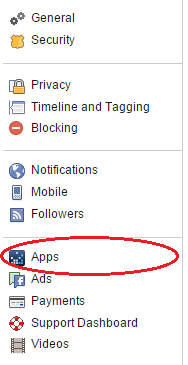
To do this, browse to your Facebook Settings page and select “Apps” from the left side navigation bar.
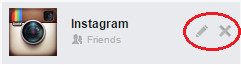
When you hover over any app that appears there, two icons will appear: a pencil to edit the app permissions, and an “x” to remove the app.
8. Check your other online accounts
Is your Facebook account password the same one you use for other online services? If so, you should change your passwords on those services immediately. Attackers often reuse passwords to gain access to more of the victim’s accounts.
What happens if my password has been changed?
If your Facebook password was changed and you can’t get into your account, try recovering your password here. Make sure you have access to your email address, as you’ll need it in order to recover your Facebook account.
You should also visit this page if your Facebook login email was changed, or this page if you no longer have access to your login email.
Think there’s a chance a hacker also got into your Gmail account? Check out our guide on What To Do If Your Gmail Was Hacked.
Take control of your security
Perhaps now more than ever, it’s crucial to take a hands-on approach regarding the security of your personal data. Fortunately, you can use a number of freely available tools to help better safeguard your accounts and personal information. Here are a few suggestions:
- Get an antivirus solution for both your PC and phone. Check out these recommendations for the Best Free PC Antivirus Software and Top 5 Android Security Apps.
- Never reuse the same password across multiple online accounts, and always make sure you use strong passwords that include letters, numbers, and at least one symbol (like an exclamation point or question mark). To keep track of your passwords and keep them safe and secure, use a password manager like LastPass or PasswordBox.
- Use two-factor authentication on all of your accounts to enhance security.
- Get LogDog, a free anti-hacking app for Android. It protects your most valuable accounts (Gmail, Facebook, Yahoo and more) and alerts you to any suspicious activity so you can take control of your account before a hacker does.
Did you enjoy this post? If so, subscribe to get a weekly roundup from BlogDOG.